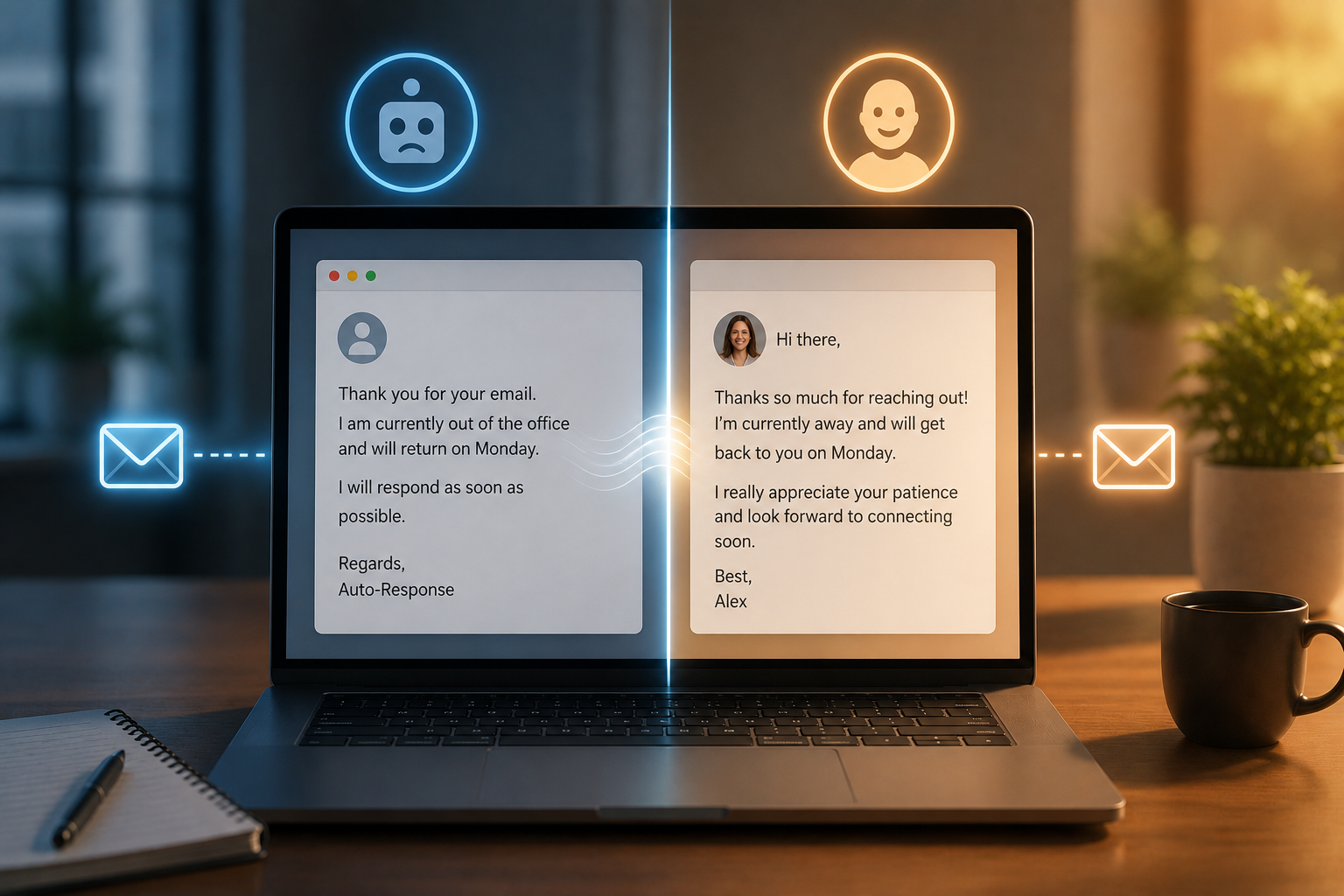
An automatic email response refers to an automated reply triggered by a specific activity, such as a customer inquiry, a purchase confirmation, a subscription registration, or an automatic reply when the recipient is out of the office. While the mechanism may be automated, the user experience does not have to be. The problem with most automatic responses is that they prioritize functionality over emotion. They acknowledge receipt of the email, provide an estimated processing time, and end with a generic closing. But they often fail to make the recipient feel appreciated. This gap between current automatic responses and how they should be causes most companies to unknowingly leave a negative impression.
A more human-sounding automatic response is crucial because it influences the perception of your brand at critical moments: shortly after the recipient has completed an action. Whether they have just submitted a support ticket or signed up for your newsletter, this first response sets the tone for all subsequent communication.
The Importance of Personalization
Generic automatic responses do not work. They treat everyone the same. Personalization solves this problem – and it is not just about adding a name. Effective personalization means tailoring the message to the contact’s context. For example, when a customer sends a support request about a billing issue, the response should clearly state the issue instead of simply saying, “We have received your message.” If the customer has just made a purchase, include the transaction details in the response. These subtle details demonstrate the system’s and the brand’s attention to the customer.
Most email platforms support dynamic fields, making this simple. Tools like Mailchimp, HubSpot, and Klaviyo make it effortless to add information such as the recipient’s name, the type of question, purchase details, and even the time of sending. By using these elements smartly, you can turn generic templates into truly personalized emails.
Use a Conversational Style
The weakness of most automated responses lies in their tone. Business language often uses a formal and passive tone, such as “We have received your question and will handle it properly.” This language creates distance rather than connection. The solution is simple: write in the tone of a helpful, well-educated person. You are welcome to use abbreviations and concise sentences. Let’s replace formal phrasing with a friendlier approach. “Thank you for your message—we will contact you as soon as possible” is very different from “Your request has been considered.”
The emotional context of the communication is also crucial. When someone complains, a response like “We have heard your feedback – we are sorry you had this experience” can immediately change the atmosphere of the interaction. When someone signs up for a product test, a sincere and enthusiastic message (“Thank you for participating”) costs nothing but can be crucial.
It is important to emphasize that friendliness is not the same as being unprofessional. The tone must still align with your brand standards and the nature of the communication. For example, an automated response from a law firm sounds different from an automated response from a direct-to-consumer e-commerce brand—yet both can seem warm and friendly.
The Secret to Effective Call-to-Actions (CTAs)
Automatic reply emails should not be mere acknowledgments of receipt. A clear call-to-action (CTA) offers recipients constructive suggestions for next steps and keeps them interested while they wait.
CTAs do not have to be aggressive or sales-oriented. For example, for technical support questions, it could be a link to a relevant help article for faster troubleshooting. For newsletter subscribers, it could be an invitation to view the resource library. In post-purchase confirmation emails, it could contain instructions on how to use the product.
Keep CTAs concise and clear. Automatic reply emails with five different links and three different actions can lead to decision fatigue. A simple, clear prompt (naturally placed within the email text) is much more effective than a long list of options.
Avoid Common Mistakes in Automatic Reply Emails
There are several practices that make automatic reply emails appear stiff and mechanical, and these deserve our attention.
Replies that are too long are a common mistake. Automatic reply emails must be concise and to the point. If they are longer than three short paragraphs, they are likely too long. Emphasize the most important points: mention the key points, describe the situation, and provide clear instructions. Vague time indications undermine trust. “We will contact you within one working day” is much more reassuring than “We will contact you as soon as possible.” Even concrete promises, no matter how small, are more credible than vague promises.
Using an email address marked “Do not reply” for an automatic reply is also a mistake. This implies one-way communication, and the sender does not expect a response. Where possible, use email addresses that someone monitors and state that a human will read the reply. Finally, you should avoid excessive use of automated language. Standard phrases such as “at your request” or “please take note of” are examples of this. Natural, fluent language—like you would use in an everyday conversation—is much more effective. Excellent example of an automated response
Examples of Stellar Auto-Responses
Hello [Name], thank you for your message! We have received your message and a representative will contact you within one business day. You can also visit our Helpdesk for a faster response: [link]. Thank you for your patience.
Order confirmation:
Hello [Name], your order has been confirmed! We are preparing your order and will send you a tracking link as soon as it has shipped. Please reply to this email if you have any questions, and we will be delighted to assist you.
Both emails are short, friendly, and specific and end with a follow-up step or an open communication style. They do not sound like they were generated from a form.
Automation Tools and Techniques
The right tools can help you automate human responses at scale. Platforms such as HubSpot, Intercom, and ActiveCampaign offer powerful autoresponder features, including dynamic personalized fields, behavioral triggers, and A/B testing for subject lines and text. As a company using a customer service platform, solutions such as Zendesk and Freshdesk offer the ability to set conditions for automated responses based on ticket type, priority, or customer group. This means that new customers may receive different automated responses than existing customers.
AI writing tools like Jasper can quickly assist in developing and updating templates for automated responses, ensuring a consistent tone across different applications. This is not about automating the writing process but about simplifying template creation while maintaining a personal touch.
Regardless of the tools used, it is essential to establish a regular review mechanism. Automated responses can quickly become outdated, especially when opening hours, team size, or response times vary. Templates should be reviewed quarterly to ensure they align with the brand identity and remain accurate.
Automated Replies are Part of your Brand Identity
An automated reply is much more than a simple action. Every email containing an automated reply represents your brand, your philosophy, and your relationship with the recipient. At times when the customer is highly engaged (such as after a purchase, registration, or support request), even an impersonal, mechanical response can undermine their trust.
The excellent news is that you don’t need to implement major changes to improve your automated replies. Start with your most frequently used templates. Here is a rewritten example that begins with a more personal tone, indicates a clear timeline, and clearly outlines the next steps: test it, adjust it, and then apply the same logic to other templates in your template library. Most companies do not make their emails sound more human, so people are not very receptive to personalized emails. But it is actually much simpler than you think.
FAQs
1. How can I make my automated replies sound more human?
A humanized auto-reply should contain natural language, personal details (such as the recipient’s name or the type of question), a clear timeline, and a conversational tone. Avoid business jargon, passive sentences, and vague promises.
2. How long should an email auto-reply be?
Ideally, an auto-reply should not be longer than three short paragraphs. The email should start with a greeting, contain a clear schedule or next steps, and end with a friendly conclusion so as not to overwhelm the reader.
3. Should I use a ‘Do Not Reply’ email address for an auto-reply?
No. A ‘Do Not Reply’ address implies one-way communication, and a response from the recipient is not desired. Using an address that can be verified builds trust and lets the recipient know that a real person is reading the message.
4. How often should I update my auto-reply template?
Please review your auto-reply template at least every three months. Existing templates can become outdated or misleading due to changes in team size, response time, opening hours, or product availability.
5. What are the best tools for sending personalized automated reply emails?
Popular platforms such as HubSpot, ActiveCampaign, Klaviyo, and Intercom support dynamic personalization and call triggers. Both Zendesk and Freshdesk can create conditional automated replies for customer support workflows based on issue type or customer group.

Sunita Voss wanders through software like a city flâneur—observing, testing, occasionally getting lost, always finding shortcuts. She writes about digital minimalism, hidden web tools, and tech hacks with the patience of someone who enjoys the journey and the urgency of someone who values her time. No gurus. No gatekeeping. Just discovered paths.