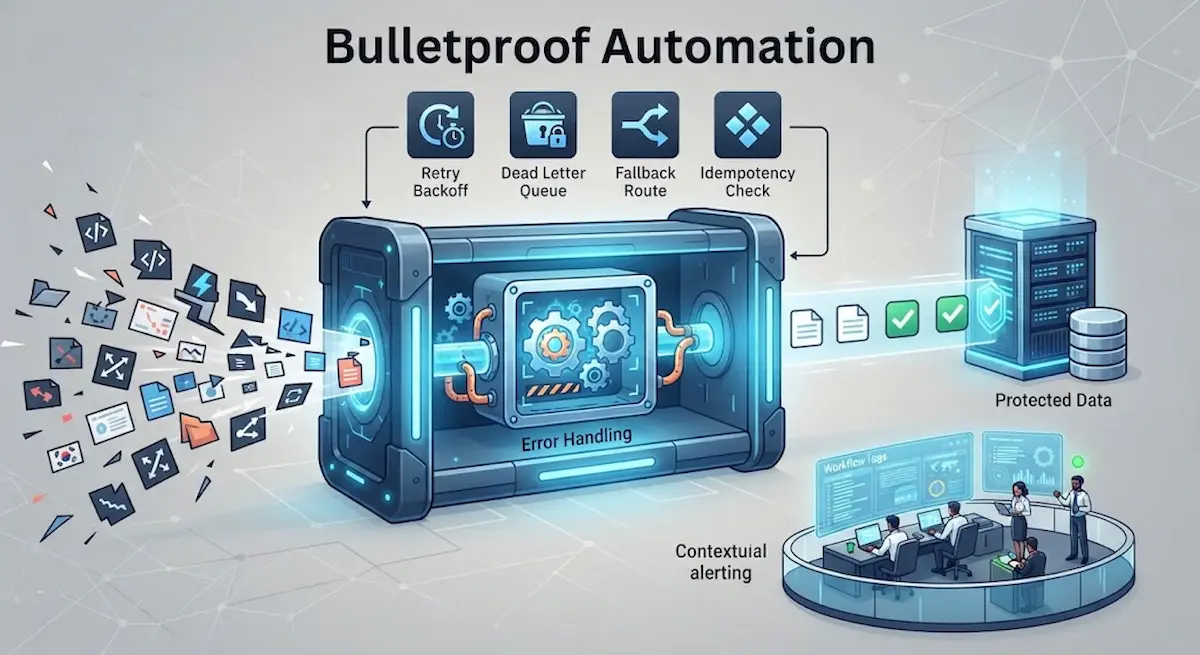
When you build an automation, your primary focus is usually on the happy path: the trigger fires, data moves smoothly across APIs, and the task finishes successfully. But real-world systems are messy. APIs go down for maintenance, third-party services change their data schemas without warning, rate limits get exceeded, and malformed inputs slip past validation checks.
When a fragile workflow encounters an unexpected error, it doesn’t just stop—it breaks things. It can overwrite clean database records with blank values, flood an inbox with thousands of erroneous emails, or silently swallow important data packets without leaving a trace.
Building professional, resilient automations requires designing systems that fail safely. Rather than pretending errors won’t happen, a bulletproof workflow anticipates failure points, contains the damage, and protects your underlying data at all costs.
1. Why Fragile Automations Corrupt Data
Most automation failures stem from a few common architectural flaws:
-
Blind Trust in Incoming Data: Assuming that an incoming webhook, form field, or API response will always deliver clean, expected data formats.
-
Lack of State Isolation: Allowing a script to execute write operations directly to a production database mid-flow, meaning a mid-process crash leaves records half-updated and corrupted.
-
Zero Error Distinction: Treating a temporary network timeout (which will resolve in two minutes) the exact same way as a permanent code failure (like a missing column name).
To bulletproof your workflows, you must implement structural safeguards across your pipeline.
2. Four Core Patterns for Fault-Tolerant Workflows
Professional automation design relies on established engineering patterns that handle exceptions gracefully:
| Error Handling Pattern | How It Works | Best Used For |
| Retry with Exponential Backoff | Automatically retries a failed action after 1s, 2s, 4s, 8s, etc., up to a hard cap. | Temporary network glitches, server timeouts, and API rate limits (HTTP 429/503). |
| Dead Letter Queue (DLQ) | Parks failed items in an isolated queue for manual inspection instead of dropping them or crashing. | Preserving data integrity when payload structures fail or data validation breaks. |
| Fallback & Degradation | Switches to an alternative secondary route if the primary integration fails. | Maintaining uptime (e.g., writing to a backup Google Sheet if the primary CRM API drops). |
| Idempotency Checks | Ensures running the exact same automation task twice results in zero duplicate data modifications. | Preventing duplicate billing, double emails, or repeated record creation during retries. |
3. Step-by-Step Blueprint for Safe Failure Design
Step 1: Validate and Sanitize at the Entry Point
Never pass raw data straight from a trigger into downstream execution steps. Validate required fields, check data types (e.g., ensuring a string isn’t passed where an integer is required), and normalize dates early. If the payload fails validation, halt the flow immediately and log a clean warning before any database interactions occur.
Step 2: Implement Idempotency
Automations often retry failed steps automatically. If your script creates a new user profile in a database, a retry loop could accidentally create five identical profiles.
-
The Fix: Always check if a unique identifier (like an email hash or transaction ID) already exists before executing a write or create action. If it exists, update the record instead of duplicating it.
Step 3: Use Staging Buffers for Bulk Operations
Never let an automated script perform destructive bulk actions (such as mass deletions or database updates) live in real time. Instead, stage the intended changes into a temporary buffer table or log file. Run an automated verification check, and only commit the batch if all validation parameters pass successfully.
Step 4: Configure Contextual Alerting
When an automation experiences a permanent failure, you need to know immediately—without digging through raw server logs.
-
Route critical alerts directly into your team’s communication hubs (like Slack or Microsoft Teams).
-
Ensure the alert includes the exact execution ID, the failing payload, and the specific error message so you can diagnose the root cause in seconds.
Frequently Asked Questions
Q: Should I retry every error that occurs in an automation?
A: No. You should only retry transient errors (such as temporary network timeouts, 502/503 server errors, or rate limits). Never retry permanent errors (such as 404 Not Found, 401 Unauthorized due to revoked credentials, or data validation errors), because running them again will never fix the underlying issue and will only waste compute resources.
Q: What is the difference between a retry loop and a dead letter queue?
A: A retry loop attempts to execute the exact same task immediately or after a short delay, hoping the temporary glitch has cleared. A dead letter queue (DLQ) is a safety parking lot: once all automated retry attempts are exhausted, the failed payload is safely stored in an isolated database or file so a developer or operator can inspect it, fix the bug, and reprocess it manually later.
Q: How can I test my workflow’s error handling before putting it into production?
A: Deliberately inject failures into your testing environment. Mock your primary API to return HTTP 500 error codes, send intentionally malformed input data, or revoke API credentials mid-run. If your workflow catches these exceptions, routes them to a fallback or alert state without corrupting your data, it is ready for production.