The conventional remedy is to exert greater effort in recollection. That is effective temporarily, although memory is an inadequate mechanism for organizing recurring tasks. Automated reminders provide a superior method as they transfer the obligation from your recollection to an independent system.
An advanced automation platform is not a prerequisite for initiation. A calendar, task organizer, spreadsheet, project management software, or customer relationship management system might already possess the necessary features to generate effective reminders. The important part is understanding what should trigger the reminder, when it should appear, and what information it should contain so that you can act without having to reconstruct the task from scratch.
Start With the Tasks That Keep Slipping Through the Cracks
Before creating reminders, spend a few days noticing which tasks you repeatedly remember too late. These are usually more useful automation candidates than tasks you already handle reliably. Look at missed follow-ups, recurring administrative work, renewal dates, routine checks, unfinished approvals, reports, maintenance activities, and tasks that depend on another event happening first.
There is an important difference between a task you occasionally forget and a genuinely unpredictable task. If something happens randomly and without any useful warning signal, an automatic reminder may not solve the problem. If the task happens every Friday, occurs 30 days after another event, or becomes necessary whenever a particular status changes, automation is much more practical.
For example, imagine you regularly need to follow up with a prospect two business days after sending a proposal. Creating a reminder manually each time adds another small job to the process. A better system can create the follow-up automatically when the proposal is marked as sent. The reminder is then connected to the event that actually matters rather than relying on someone to remember what should happen next.
Think in Triggers, Delays, and Actions
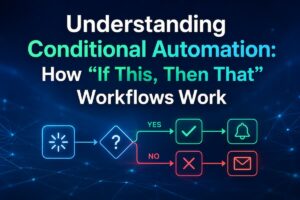
Most automatic reminders can be understood using three simple parts: something happens, a certain amount of time passes, and the system creates an action. Learning to think this way makes automation much easier to design.
The first part is the trigger. A trigger is the event that tells the system it may eventually need to send a reminder. It could be a task being completed, a new customer being added, a project moving to a particular stage, an invoice being issued, a calendar date arriving, or a form being submitted.
The second part is the delay or timing rule. The reminder might be needed immediately, one day later, seven days before a deadline, or on the first working day of every month. Timing should be based on the real workflow rather than an arbitrary interval. The final part is the action. The system may create a task, send an email, display a notification, add an item to a task list, or alert a particular employee. Keeping these three elements separate makes it easier to troubleshoot the automation later.
| Trigger | Timing | Reminder action |
|---|---|---|
| The proposal is sent. | 2 days later | Create a follow-up task. |
| Subscription renewal date approaches | 30 days before | Send a review reminder. |
| The project reaches completion. | 7 days later | Prompt for a follow-up review |
| The monthly reporting period ends. | First working day | Create a reporting task. |
This simple structure is enough to describe a surprising number of useful reminder systems. Once you can identify the trigger, timing, and action, the technical setup becomes much easier.
Choose the Right Place to Create the Reminder
The best reminder system is usually the one closest to the information that determines when the task needs to happen. If the task is based on a calendar date, a calendar application may be enough. If it depends on project status, a project management system is often a better place. If it depends on a customer record, a CRM may be the most logical place.
This matters because scattered reminders can create their own problems. Suppose a sales team manages customer follow-ups in a CRM but keeps separate reminders in personal calendars. A salesperson may leave the company, change the date, or forget to update the calendar when the customer status changes. The reminder then becomes disconnected from the actual business process.
Keeping the reminder close to its source makes the information easier to maintain. When the underlying task changes, the reminder can often change with it. It also makes ownership clearer because the task remains part of the workflow rather than living only in one person’s personal reminder list. That does not mean every reminder needs sophisticated software. For a simple personal responsibility, a recurring calendar event may be perfectly adequate. The goal is not to automate everything. The goal is to put each reminder in a place where it is most likely to remain accurate.
Use Recurring Reminders for Truly Repetitive Work
Recurring reminders are useful when the same responsibility follows a predictable schedule. They can be used for weekly reviews, monthly reports, quarterly checks, annual renewals, routine maintenance, or other activities that happen repeatedly.
When setting one up, pay attention to the actual timing rather than simply choosing a convenient interval. A task that must be completed on the first working day of each month is different from one that occurs exactly 30 days after the previous completion. A quarterly review may also need to happen after the previous quarter closes rather than on a fixed calendar day.
Recurring reminders should also contain enough information to make the task actionable. “Monthly review” may not be sufficiently informative if you have several different reviews. A better reminder might identify what needs to be checked, where the information can be found, and what should be completed before the task is marked finished. Keep recurring reminders under review. If a responsibility changes, please update the recurring rule. An old recurring reminder can become background noise when the underlying process no longer exists.
Build Reminders Around Events, Not Just Dates
Date-based reminders are easy to understand, but event-based reminders are often more useful for business processes. A fixed date tells you when something happens. An event-based reminder tells you when something needs to happen in relation to another event.
Consider an employee onboarding process. The relevant reminder might be something other than “send a welcome message on the fifth of every month.” It may be to remind the manager to check in with the new employee seven days after their start date. The trigger is the employee’s start date, not the calendar itself.
The same principle applies to customer service. A team might need to follow up three days after resolving a complaint. Creating a fixed reminder for every possible date would be cumbersome. Linking the reminder to the resolution event creates a system that adapts to when the work actually happens. Event-based reminders are particularly valuable when many people are performing the same process at different times. Instead of asking every employee to remember the next step, the system can create the reminder consistently whenever the triggering event occurs.
Give the Reminder Enough Context to Be Useful
A reminder can technically appear at the correct time and still fail to solve the problem. This happens when the notification is too vague to tell the person what they need to do.
Imagine receiving a notification that simply says, “Follow up with the customer.” You may have dozens of customers and several ongoing conversations. Before acting, you need to find the relevant customer, remember what happened last time, locate the previous communication, and work out what the follow-up is supposed to accomplish.
A more useful reminder identifies the task and connects it to the relevant information. It might say that a customer needs to be contacted about a proposal sent two days earlier and provide a direct link to the relevant record or document. The reminder then becomes a prompt for action rather than another item that requires investigation. Effective reminders should answer the basic questions a person will have when they see them: what needs to happen, why it matters, when it needs to happen, and where the supporting information is located. You do not need a long description. You need the right context.
Do Not Automate Every Reminder You Can Think Of
Automation becomes less useful when people receive too many notifications. If every small activity creates an alert, employees quickly learn to ignore them. Eventually, important reminders become indistinguishable from routine background noise. A useful test is to ask whether missing the reminder would create a meaningful problem. If the answer is no, the task may not need an automated alert. Some activities can remain visible on a normal task list without generating a separate notification.
It is also worth considering whether the person needs a reminder at all. If a task already happens automatically, creating another notification merely tells someone that the system did what it was designed to do. Automation should reduce unnecessary attention, not redirect it. For important tasks, multiple reminders can sometimes make sense. A major deadline might warrant an early warning followed by a final reminder. For routine work, one well-timed notification is usually better than several interruptions.
Use Different Reminder Timing for Different Kinds of Work
There is no universal “best” reminder time. The right timing depends on how much preparation the task requires and what happens if it is missed. A reminder to submit a short internal form may only need to appear on the day it is due. A reminder about a contract renewal may need to arrive weeks earlier because someone needs time to review terms and make a decision. A customer follow-up may need to happen soon enough to keep the conversation going.
consider the amount of lead time required. If a task requires research, approval, communication, or coordination with another person, the reminder should arrive before the actual deadline. If it is a quick administrative action, a much shorter warning may be sufficient. For deadlines that carry meaningful consequences, consider using an early reminder and a final reminder rather than relying on one notification. This creates some protection against missed alerts, busy schedules, and days when the responsible person is unavailable.
Make Sure Someone Owns the Reminder
An automatic reminder still needs a clear owner. A notification sent to a general team inbox may technically reach everyone while effectively belonging to nobody. Assign reminders to the person or role responsible for completing the task. If responsibility changes when a project moves between departments, the automation should account for that change. Otherwise, the original owner may continue receiving reminders for work that no longer is theirs.
Shared responsibility can work for some processes, but it should be deliberate. “Everyone should remember this” is usually a sign that ownership has not been defined clearly enough. A system works better when it knows who is expected to act. Review ownership whenever teams change. New employees, departures, reorganizations, and changes in job responsibilities can quietly make old reminder rules inaccurate.
Test the Automation Before Depending on It
An automatic reminder should be tested just like any other workflow. Do not assume that because the rule looks correct on screen, it will behave exactly as expected in real use. Create a test record or task and trigger the process manually if the platform allows it. Check whether the reminder is generated at the correct time, assigned to the right person, contains the expected information, and appears through the intended notification channel.
Test unusual situations too. What happens if the original task is cancelled? What if the customer changes status? What if the responsible employee changes? What if the triggering event occurs twice? These cases can create duplicate reminders or reminders for tasks that are no longer relevant. It is especially important to verify whether an automation can create duplicates. If an employee changes a record back and forth between two statuses, the system might create the same reminder multiple times unless the workflow has a condition preventing it.
Prevent Old or Irrelevant Reminders From Accumulating
A reminder system needs an exit condition as well as a trigger. Otherwise, it may continue asking someone to perform a task after the task has already been completed or the situation has changed. For example, an automated system might create a reminder to contact a customer seven days after it sends a proposal. If the customer accepts the proposal before those seven days pass, the follow-up reminder may no longer make sense. The automation should be designed to recognize that change when possible.
This is one reason automation should be connected to the actual state of the work. A reminder should not exist independently from the task it represents. If the underlying condition disappears, the reminder should ideally be cancelled, updated, or marked as unnecessary. Regularly review automated reminders that generate a large number of ignored or cancelled tasks. High cancellation rates can indicate that the trigger is too broad or that the timing does not match the real workflow.
Start With One Problem and Improve From There
The easiest way to build a useful reminder system is to start with one task that is regularly forgotten and has a clear trigger. Do not begin by trying to automate every responsibility in your personal or business life. Choose something simple, such as following up after sending a proposal, reviewing a monthly report, checking an upcoming renewal, or completing a routine project review. Identify the event that starts the process, decide how much warning is useful, and create a reminder that contains enough information to act immediately.
Use the first automation as a small experiment. If the reminder arrives too early, adjust it. If it generates unnecessary alerts, please narrow the conditions. If the description is vague and people are overlooking it, please consider adding more useful context. The goal is not to create a perfect automation on the first attempt. The goal is to build a reminder that genuinely reduces the chance of forgetting the task. Once that process works reliably, look for the next recurring problem. Over time, a handful of carefully designed reminders can remove a surprising amount of mental overhead without turning everyday work into a complicated network of automated notifications.
FAQs
1. What are the best tasks to set reminders for?
Tasks with predictable triggers or due dates are usually the best options. Examples: repeat reviews, client follow-ups, renewal checks, routine reports, planned maintenance, approval requests, chores that have to happen a specific number of days after another event.
2. Why do I constantly forget automated reminders?
One reason is too many notifications. Another is hazy reminders. Reminders that lack clear descriptions of required actions or arrive at inconvenient times are unhelpful and are gradually stopped. Make reminders more effective by reducing unwanted warnings and providing more context.
3. Will auto-reminders create duplicate tasks?
“Yes. Poorly built automation can trigger multiple times on the same record or event, causing it to change repeatedly. Test the workflow with several changes and add conditions to verify if a similar job already exists to avoid creating a new reminder.
4. Does every deadline need a couple of reminders?
No. Some reminders are useful when the deadline has real effects, or when preparing takes time. Multiple notifications for simple activities can become noise. Schedule reminders by how much lead time the person genuinely needs.
5. How can I know if an automatic reminder is working?
See what happens when the reminder goes out. If you perform activities more consistently and miss deadlines less often, then the automation is doing its job. If a reminder is routinely ignored, canceled or made after the work has been completed, evaluate the trigger, timing, ownership and phrasing.